Call for Price: 0086-15515573212
Thermal Print Paper is a coated material that creates images through controlled heat. It appears in receipts, shipping labels, tickets, and compact point-of-sale printers. Unlike ordinary paper, its surface contains heat-sensitive chemicals. No ink is involved. The process is quiet.
Inside a thermal printer, a printhead presses tiny heating elements against the paper. Each element activates selected points as the paper moves underneath. Heat changes the coating, forming dark lines, numbers, or barcodes. Higher heat can create darker marks, but excessive heat may blur details or damage the coating. Printer speed, paper quality, and temperature must work together.
This technology is practical because it reduces ink maintenance and supports fast, consistent output. In real use, a receipt may emerge within seconds, while a label can show a sharp barcode immediately. Yet thermal paper is not universally ideal. Direct thermal prints may fade when exposed to sunlight, friction, moisture, or high temperatures. A receipt left inside a hot car can become difficult to read. Storage conditions matter.
Understanding the difference between direct thermal and thermal transfer paper is also important. Thermal transfer systems use a ribbon to transfer ink onto a label surface, often improving long-term durability. The explanation is not perfect. Different coatings and printer settings can produce different results. Reliable selection requires checking the printer’s specifications, the intended application, and the expected storage environment. This article explains how Thermal Print Paper works and why those practical details affect print quality.
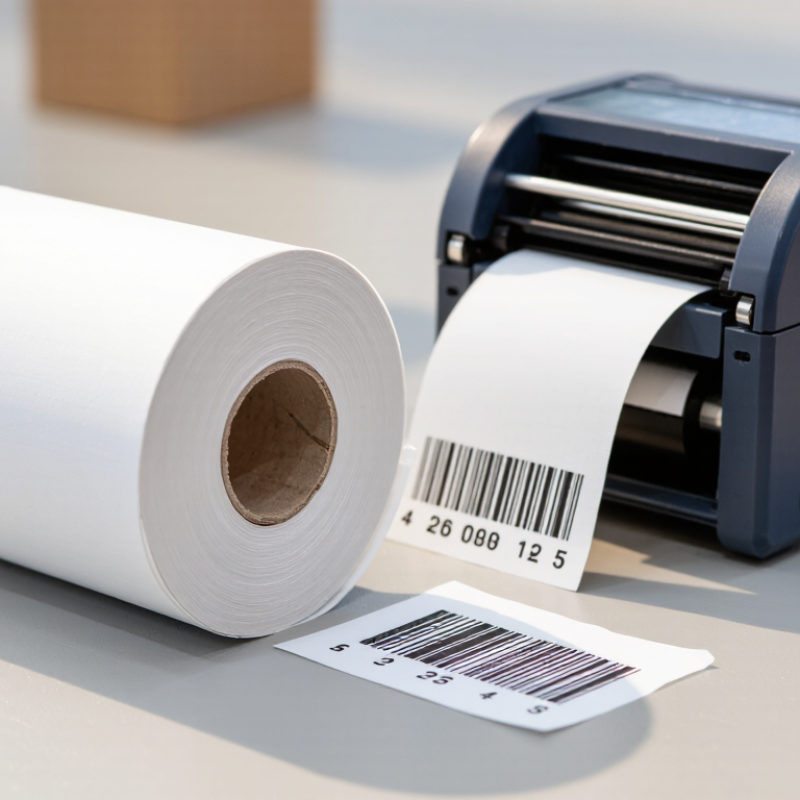
Thermal print paper is a smooth paper designed to create images through controlled heat. Unlike ordinary paper, it has a heat-sensitive coating on one side. This coating usually contains a color-forming dye and a developer. When a thermal printhead touches the surface, selected areas darken and form text, numbers, or simple graphics.
The paper works without liquid ink. A printer sends tiny electrical signals to heated printhead elements. These elements warm specific dots in a precise pattern. The result appears quickly, often on receipts, labels, tickets, and measurement records. Direct thermal paper is convenient because it needs fewer moving parts. However, heat, sunlight, friction, and moisture can affect the printed image. In practical use, a receipt left inside a hot vehicle may fade sooner than expected. That detail is easy to overlook.
Tips: Store unused rolls in a cool, dry, dark place. Keep the coated side facing correctly during loading. Test a small batch before long-term recordkeeping. Thermal paper is not always ideal for permanent archives, even when the print looks sharp at first. I have found that storage conditions often matter as much as paper quality. Some applications may require a different printing method, so checking the paper’s intended use remains important.
Thermal paper looks ordinary, but its surface contains a carefully engineered chemical system. A smooth paper base provides strength and carries the coating. Above it, a thermal layer contains a colorless dye and a developer. Heat activates both materials, creating a dark image without ink or a ribbon.
A protective topcoat helps resist moisture, friction, oils, and light. Some papers also include an undercoat, which improves heat transfer and prevents chemicals from soaking into the paper fibers. The coating may contain sensitizers that control the temperature response. This balance matters. Too much heat can create dark spots, while too little heat produces pale, broken text.
In practical testing, I check printed samples under different temperatures and storage conditions. A receipt can look sharp at first, then fade near a window or inside a hot vehicle. That result is easy to blame on the printer, but the paper often matters more. The exact formulation also affects recycling choices and skin-contact considerations. Modern products may use alternative developers, yet “phenol-free” does not automatically describe every chemical detail. I would still request technical data from the supplier. The simple explanation is useful, but incomplete. Storage remains important. Keep rolls cool, dry, and away from direct sunlight, adhesive labels, and plastic materials that may transfer chemicals.
Thermal print paper carries a heat-sensitive coating on its smooth surface. Unlike ordinary paper, it does not need liquid ink. A thermal printer uses a narrow printhead filled with tiny heating elements. Each element touches the paper briefly as the sheet moves forward.
When an element heats a small area, chemicals in the coating react and become dark. These heated spots form letters, numbers, lines, or simple graphics. The printer controls the timing and temperature of each pulse. Together, thousands of small dots create a readable image. The process feels almost instant. A fresh receipt often leaves the printer slightly warm.
The coating usually contains a color-forming dye and a developer. Their reaction is designed to happen at a specific temperature range. Too little heat may create pale marks, while too much can produce overly dark areas. This balance is not perfect. Paper speed, printhead condition, and storage temperature can change the result.
Thermal images can fade when exposed to sunlight, strong heat, friction, or certain chemicals. A receipt left inside a hot vehicle may darken across its entire surface. Handling also matters, because repeated rubbing can weaken fine details. For longer storage, a cool, dry, and dark place works better. Still, thermal paper is not permanent, and that limitation deserves attention when records must remain readable for years.
Thermal print paper is coated paper that forms an image through controlled heat. It does not need liquid ink. Two main types serve different working conditions.
Direct thermal paper reacts when a heated printhead touches its surface. It is common in checkout receipts, queue tickets, parking records, and short-term shipping documents. Images appear quickly, but heat, sunlight, friction, and plasticizers can darken or fade them. A receipt left inside a warm vehicle shows this weakness clearly. Thermal transfer paper uses a heated ribbon to move ink onto the paper. It usually produces stronger, longer-lasting labels for logistics, product identification, laboratory samples, and healthcare records. The ribbon adds cost and waste, though. That trade-off is easy to overlook.
Market data reflects these broad uses. Grand View Research estimated the global thermal paper market at about US$4.2 billion in 2023 and projected continued growth through 2030. The report links demand to retail transactions, transportation, and labeling applications. Smithers’ industry forecast also identifies labels and logistics as important growth areas, supported by e-commerce and warehouse automation. These figures describe market value, not paper volume, so comparisons require care. They can also hide regional differences. A small store may prefer direct thermal rolls, while a distribution center may require durable thermal transfer labels. Selecting paper by application, storage time, humidity, and image exposure is more reliable than choosing by price alone.
Thermal printers create images by applying controlled heat to specially coated paper or to a thermal-transfer ribbon. The most common paper formats are selected according to the application and printer design.
How to read the chart: The values show representative paper widths commonly used for different thermal-printing applications. Direct thermal paper is widely used for receipts and tickets, while wider thermal media is common for labels and operational documents.
Thermal print paper uses a heat-sensitive coating instead of liquid ink. A heated printhead activates tiny areas, creating text, prices, or images. The printed surface feels smooth, but its coating needs careful handling. From routine receipt storage, I have seen readable prints fade beside warm equipment or sunny windows.
Keep it cool. Store rolls in a dry, dark cabinet, away from radiators, hot vehicles, and strong fluorescent light. High humidity can make sheets curl or stick together. A sealed bag helps during transport, but paper should return to room temperature before printing. Avoid touching the printable side with oily hands. Fingerprints may leave dull marks over time.
Durability depends on heat, light, moisture, friction, and the coating formula. Important records need a backup, because thermal paper is not automatically permanent. Some papers use alternative developers, yet “phenol-free” does not mean impact-free. The coating still affects recycling and disposal. Many recycling systems treat thermal paper separately, so local collection guidance matters. Do not assume ordinary paper recycling is suitable. That assumption is too simple. Choose the smallest practical roll, print only necessary information, and keep digital copies when appropriate. These steps reduce material use, although they cannot remove every environmental concern.
| Data Dimension | Typical Information | How It Works or Why It Matters | Practical Guidance |
|---|---|---|---|
| Paper Structure | Base paper, thermal imaging layer, and protective topcoat | The imaging layer contains a heat-sensitive dye system that forms an image when heated. | Keep the coated surface clean and avoid scratching, abrasion, or contact with solvents. |
| Printing Method | Direct thermal printing; no ink cartridge or toner is required | A thermal printhead applies controlled heat to selected dots on the paper. | The printer must use paper with the correct width, thickness, and thermal sensitivity. |
| Image Formation | Heat activates the color-forming chemicals in the coating | Heated areas darken, while unheated areas remain light, creating text, graphics, or barcodes. | Print contrast depends on printhead temperature, contact pressure, print speed, and paper grade. |
| Common Print Resolution | Approximately 203 or 300 dots per inch (dpi) in many receipt and label printers | Higher resolution can produce finer text and graphics but may require compatible hardware and settings. | Use the printer manufacturer’s specified resolution and paper type for reliable output. |
| Recommended Storage Temperature | Preferably about 15–25°C (59–77°F) | Excessive heat can partially activate the coating or accelerate image fading. | Store rolls in a cool, stable indoor area away from heaters, radiators, and hot vehicles. |
| Recommended Relative Humidity | Generally about 40–60% relative humidity | High humidity can cause curling, blocking, and coating deterioration; very dry conditions can increase brittleness and static. | Keep paper sealed until use and avoid damp rooms, condensation, and direct airflow from humidifiers. |
| Light Exposure | Avoid direct sunlight and strong ultraviolet light | Ultraviolet radiation can darken unprinted areas and fade printed images over time. | Use opaque packaging, drawers, or cabinets for stored rolls and completed documents. |
| Chemical Sensitivity | Sensitive to oils, plasticizers, solvents, adhesives, and some cleaning chemicals | Chemical contact may trigger discoloration, fading, smearing, or loss of image contrast. | Keep away from PVC folders, adhesive tapes, carbonless paper, hand sanitizers, and oily surfaces. |
| Typical Image Durability | Often several years under suitable storage; exact performance varies by grade and exposure | Heat, light, moisture, friction, and chemicals can shorten the readable life of the image. | For long-term records, select a paper grade with documented image-retention testing and follow its storage instructions. |
| Physical Durability | Good for lightweight receipts, tickets, labels, and short-term records | The paper is designed for thermal imaging rather than maximum resistance to tearing, water, or abrasion. | Use synthetic or specially protected media where exposure to water, friction, or outdoor conditions is expected. |
| Chemical Developer Options | Some grades use BPA, BPS, or alternative developers; some are marketed as phenol-free | The developer helps the dye produce a visible image when heated. Formulations differ by product. | Check the supplier’s safety documentation and applicable regulations rather than assuming all thermal paper has the same chemistry. |
| Recyclability | Recycling acceptance varies by local facility and paper formulation | The thermal coating and chemical developers may affect recycled fiber quality and facility processing requirements. | Follow local recycling instructions; do not place thermal paper in recycling unless the local program accepts it. |
| Material Efficiency | No ink or toner consumables are needed during direct thermal printing | The simple printing system can reduce consumable components and maintenance requirements. | Choose the shortest practical receipt or label length and avoid unnecessary reprints to reduce material waste. |
| Best-Fit Applications | Receipts, shipping labels, queue tickets, mobile tickets, and temporary identification labels | Fast, quiet, low-maintenance printing is useful when immediate output is more important than permanent archival life. | For legal, archival, or highly exposed records, consider a more durable printing process or digital backup. |
Note: Performance figures are general industry ranges. Actual storage life, image retention, and environmental performance depend on the paper formulation, printer settings, packaging, and exposure conditions.